


The right printer can quietly transform how your business runs every single day. From faster billing to smoother customer service, a reliable machine saves time, reduces stress, and keeps everything professional.
If you’ve ever dealt with slow printing, paper jams, or unclear receipts, you already know how frustrating it can be. Choosing the right device is not just about features, it’s about making your daily work easier and more efficient.
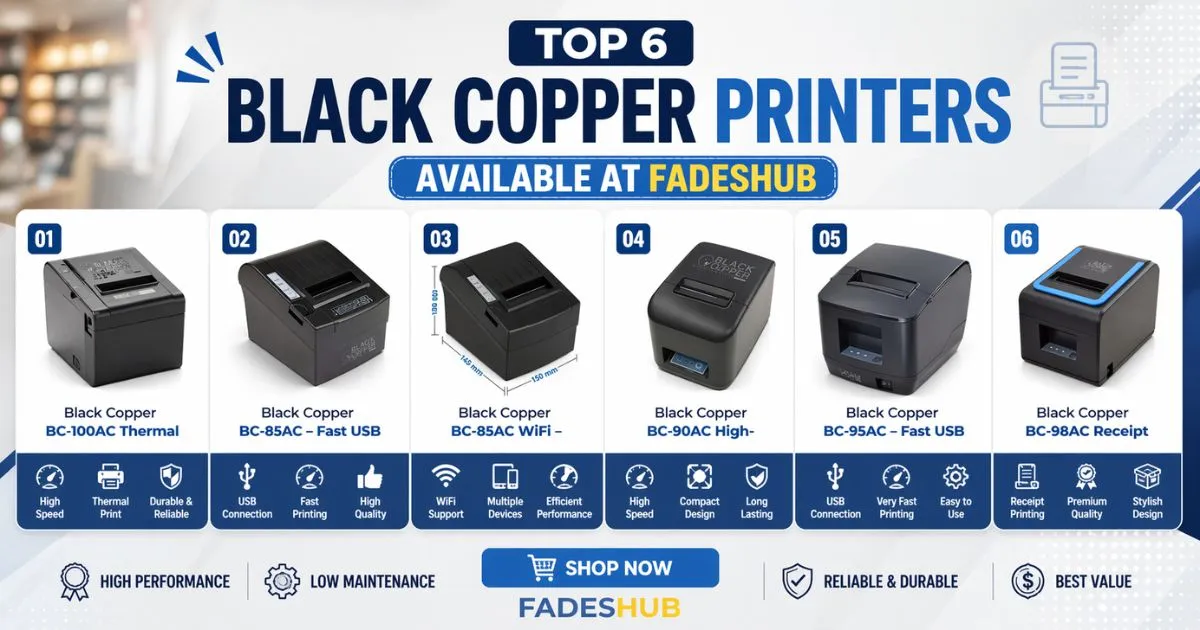
In this guide, we will show you the top 6 Black Copper printers available at Fadeshub, along with their uses, benefits, comparison, and how to choose the best one for your needs in Pakistan.
Why Black Copper Printers Are Popular in Pakistan
Black Copper printers are widely used in shops, restaurants, pharmacies, and offices across Pakistan. The reason is simple: they are built for daily use and offer consistent performance.
These printers are mostly thermal, which means they don’t need ink. This reduces cost and maintenance, making them ideal for businesses that print receipts all day.
Key Advantages
- No ink or toner required
- Fast printing speed
- Low maintenance
- Compact design (fits small counters)
- Reliable for continuous use
1. Black Copper BC-100AC Thermal
This model is a strong choice for businesses that need stable and long-term performance. It is designed for heavy-duty usage, making it suitable for busy environments.
It delivers clear and sharp prints, which is important for receipts where details matter. The build quality is solid, so it can handle daily wear and tear easily. If you want to buy Black Copper BC-100AC Thermal, this is a great option for long-term use.
2. Black Copper BC-85AC – Fast USB
This printer is perfect for users who prefer a simple USB connection. It is easy to set up and works smoothly with most systems.
The speed is impressive for its size, and it performs well in small to medium businesses. It’s a practical choice if you want something fast without complications. If you want to buy Black Copper BC-85AC Fast USB, this is ideal for quick and easy setup.
3. Black Copper BC-85AC WiFi
This version adds wireless convenience. You don’t need cables, which makes your workspace cleaner and more flexible.
It’s especially useful for modern setups where multiple devices need access to the printer. It saves time and improves workflow. If you want to buy Black Copper BC-85AC WiFi, it’s perfect for wireless printing needs.
4. Black Copper BC-90AC High
This model offers a balanced combination of performance and durability. It is slightly more advanced and handles higher workloads efficiently.
The print quality is consistent, and it works well in environments where speed and clarity are both important. If you want to buy Black Copper BC-90AC High, it’s a solid mid-range option.
5. Black Copper BC-95AC – Fast USB
This printer focuses on speed and reliability. It connects through USB and delivers quick results without delays.
It’s suitable for businesses that handle continuous transactions and need a printer that keeps up with demand. If you want to buy Black Copper BC-95AC Fast USB, it’s a great pick for fast-paced work.
6. Black Copper BC-98AC Receipt
This is one of the more premium options in the list. It is designed specifically for high-quality receipt printing.
The design is modern, and it performs smoothly even during long hours of use. It’s a great choice for businesses that want both style and performance. If you want to buy Black Copper BC-98AC Receipt, it’s a premium solution for professional use.
Comparison Table of Top 6 Printers
| Model | Connectivity | Best For | Speed | Use Case |
| BC-100AC Thermal | USB | Heavy-duty use | High | Large shops |
| BC-85AC Fast USB | USB | Simple setup | Fast | Small businesses |
| BC-85AC WiFi | WiFi | Wireless use | Fast | Modern setups |
| BC-90AC High | USB | Balanced use | Medium-High | Medium businesses |
| BC-95AC Fast USB | USB | Fast workflow | Very Fast | Busy counters |
| BC-98AC Receipt | USB/WiFi | Premium use | High | Professional setups |
How to Choose the Right Printer
Choosing the right printer depends on your daily needs. Not every model is perfect for everyone, so understanding your usage is important.
Consider These Points
- Workload: Heavy or light daily printing
- Connectivity: USB or WiFi
- Space: Small counter or large workspace
- Speed: Required printing speed
- Budget: Entry-level or premium
If your work is simple, go for USB models. If you want flexibility, WiFi models are better.
How to Use a Thermal Printer (Simple Guide)
Using a thermal printer is easy, even for beginners.
Step-by-Step
- Plug in the printer and connect it (USB or WiFi)
- Install the required drivers
- Load thermal paper correctly
- Connect it to your POS or system
- Start printing
Always make sure the paper is placed properly, or printing may not work correctly.
Common Mistakes to Avoid
Many users face issues because of simple mistakes. Avoiding these can save time and money.
Don’t Do These
- Using low-quality paper (causes fading)
- Pulling paper forcefully (damages cutter)
- Ignoring cleaning (reduces performance)
- Wrong installation of drivers
- Overloading the printer
Taking care of these small things keeps your printer running smoothly.
Benefits of Using Thermal Printers
Thermal printers are different from traditional printers. They are faster and more efficient.
Key Benefits
- No ink cost
- Faster printing
- Quiet operation
- Easy maintenance
- Long-lasting performance
For businesses in Pakistan, this means lower costs and better efficiency.
Where These Printers Are Used
These printers are used in many industries because of their speed and reliability.
Common Use Cases
- Retail shops
- Restaurants and cafes
- Supermarkets
- Pharmacies
- Ticketing counters
If your business prints receipts regularly, these printers are a must-have.
Final Thoughts
Choosing the right printer is not just about features, it’s about making your daily work easier. Each of these Black Copper printers available at Fadeshub offers something unique, whether it’s speed, wireless convenience, or durability.
If you want something simple, go for USB models. If you want flexibility, choose WiFi. And if your workload is high, pick a heavy-duty option.
Frequently Asked Questions About Black Copper Printers
If you run a small shop, a USB model like BC-85AC Fast USB is a good choice. It’s simple to set up, works fast, and doesn’t require any technical setup.
A WiFi printer is better if you want flexibility and a clean workspace without cables. But if you prefer stability and easy setup, a USB printer works perfectly.
No, these are thermal printers, so they don’t need ink or toner. They print using heat on special paper, which saves money and reduces maintenance.
With proper use and regular cleaning, a thermal printer can last for several years. Avoiding low-quality paper and rough handling helps increase its life.


